Field notes/Product Page & CRO
Shopify Cart Abandonment by Funnel Stage: Where to Fix First
Cart abandonment is not one problem. Use the funnel stage to decide whether to fix product-page clarity, cart confidence, checkout friction, shipping surprise, payment trust, or tracking noise.
A high abandoned-cart number is only useful when it is tied to the stage where intent turns into doubt. The fix for low add-to-cart is different from the fix for high checkout starts and weak purchases.
How should Shopify stores diagnose cart abandonment?
Shopify stores should diagnose cart abandonment by the funnel stage where buyer intent drops: product views to add-to-cart, add-to-cart to reached checkout, reached checkout to purchase, and post-abandonment recovery. Each stage has a different likely cause. Low add-to-cart usually means the product page did not create enough clarity or trust. Strong add-to-cart but weak checkout starts often means the cart exposed cost, delivery, discount, or confidence problems. Strong checkout starts but weak purchases usually means payment, shipping, account, policy, or checkout friction appeared too late. Start by locating the stage, then inspect the promise, proof, cost, risk, and technical path for that stage before adding discounts or rebuilding the whole store.
Key takeaways
- Cart abandonment should be diagnosed by stage, not as one blended storewide metric.
- Low add-to-cart usually points upstream to product-page clarity, proof, price context, or traffic intent.
- High add-to-cart with weak checkout starts usually points to cart confidence, shipping visibility, discount clarity, or mobile cart friction.
- High checkout starts with weak purchases usually points to total cost, payment trust, delivery timing, checkout errors, or policy surprise.
- Recovery emails and discounts work better after the core stage leak is known.
Cart abandonment is easy to overread because the phrase sounds specific. Operators use it to describe several different leaks: shoppers who never add to cart, shoppers who add but never open checkout, shoppers who reach checkout and stop, and shoppers who abandon but later recover through email or retargeting.
Those are not the same problem. A product-page clarity leak will not be fixed by a checkout app. A shipping surprise will not be fixed by rewriting product descriptions. A broken payment method will not be fixed by a better abandoned-cart email. The funnel stage tells you where to look first.
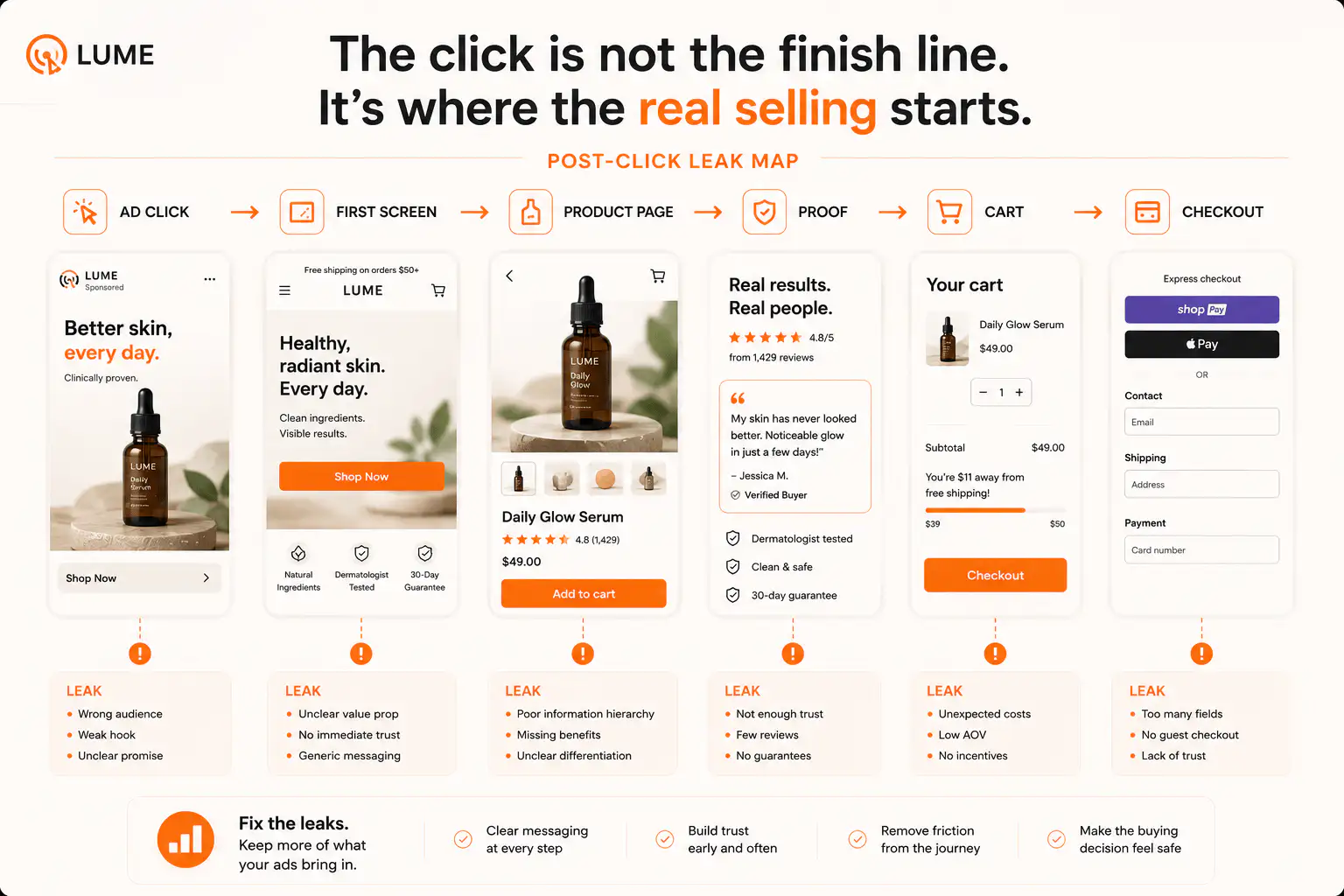
Which Shopify funnel stages should you separate first?
Start with Shopify's conversion funnel stages: all sessions, sessions with cart additions, sessions that reached checkout, and sessions that completed checkout. That sequence separates product-page persuasion, cart confidence, checkout confidence, and completed payment into distinct checkpoints.
Do not begin with the sitewide conversion rate. A single conversion-rate number hides whether the page failed to earn the first action, the cart failed to carry trust forward, or checkout introduced a new blocker.
| Stage drop | What it usually means | First place to inspect |
|---|---|---|
| Sessions to add-to-cart is weak | The buyer is not convinced enough to commit | PDP first screen, product promise, proof, price context, traffic match |
| Add-to-cart to checkout is weak | The cart changes the buyer's confidence or reveals risk | Cart drawer/page, shipping threshold, discount logic, delivery, return cues |
| Reached checkout to purchase is weak | The final cost, payment path, or checkout experience creates hesitation | Shipping/tax, payment methods, checkout errors, account friction, policies |
| Purchases happen but recovery is weak | Follow-up does not match the reason people left | Email/SMS timing, reassurance, cart contents, incentive strategy |
| Metrics look impossible | Tracking or test traffic may be distorting the funnel | Analytics setup, test orders, payment redirects, bot traffic, app/theme changes |
Benchmarks can tell you when a stage deserves attention, but they cannot tell you the cause. Use your own traffic mix, product price, repeat purchase rate, and checkout setup before declaring a number good or bad.
What if product views do not become add-to-carts?
When product views are healthy but add-to-cart is weak, the leak is usually before the cart. Buyers are seeing the offer, but the page is not making the next step feel reasonable. This is where stores often mislabel a product-page problem as cart abandonment because the final sales number is low.
- The first screen does not say what the product is for or why it is different.
- The product image looks generic, cropped, or disconnected from the claim.
- Reviews, UGC, founder proof, or warranty signals appear too late.
- Price is visible before value, outcome, or comparison context.
- Size, color, bundle, subscription, or personalization options create choice uncertainty.
- Shipping, delivery, returns, or payment reassurance is missing near the first CTA.
- Paid traffic lands on a product page that does not continue the ad promise.
The first fix is not an abandoned-cart discount. It is a product-page audit. Check whether a cold buyer can answer five questions before tapping add-to-cart: what is this, why should I want it, why should I believe it, what do I have to choose, and what happens after I order?
What if add-to-cart is strong but checkout starts are weak?
Strong add-to-cart with weak checkout starts usually means the buyer was interested, then the cart changed the emotional math. The cart might reveal shipping uncertainty, a discount mismatch, a weak product summary, an upsell that feels pushy, or a total price that no longer matches the value built on the product page.
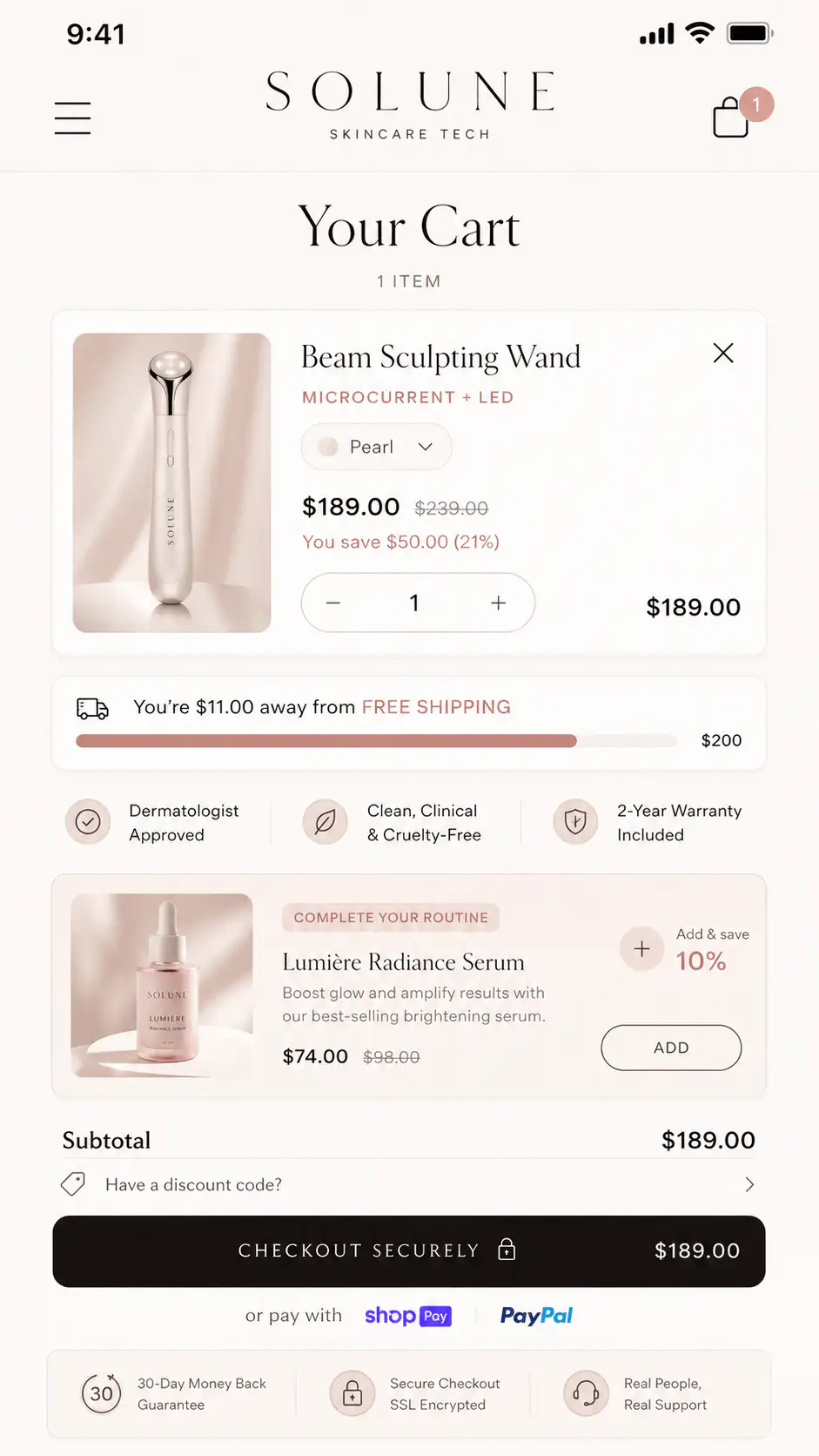
| Cart symptom | Likely cause | Fix before testing discounts |
|---|---|---|
| Cart opens but checkout click is low | The cart does not repeat enough value or trust | Show product summary, delivery cue, return cue, and clear checkout action |
| Cart drawer gets closed quickly | The drawer interrupts without answering cost or next step | Simplify drawer hierarchy and make checkout path obvious |
| Free-shipping bar appears late | Threshold changes the order decision after commitment | Show threshold on PDP and cart with exact amount remaining |
| Discount code confusion | Promo logic is hidden or contradicts the ad | Show qualification rules before cart and reflect savings clearly |
| Upsell module is ignored | The buyer has not finished the original decision | Move or simplify upsells until the cart is stable |
Cart fixes are often small but structural. The buyer needs to see the same product promise, real cost direction, delivery expectation, return confidence, and checkout button without competing modules fighting for attention.
What if reached checkout is high but purchases are low?
When checkout starts are high and purchases are low, the buyer has shown real purchase intent. This is the stage where late surprises hurt most. Baymard's checkout research points to extra costs, slow delivery, payment trust, account requirements, complexity, return concerns, site errors, unclear total cost, missing payment methods, and card declines as common checkout-stage abandonment reasons.
Do not assume price is the only issue. Price may be fine, but the buyer may discover the wrong shipping promise, an unavailable payment option, a forced account path, a currency mismatch, a discount failure, a delivery date that arrives too late, or a trust gap that should have been handled before checkout.
- Place a test order on mobile with the most common product, variant, and payment method.
- Repeat with the top paid-traffic device or browser if traffic is concentrated there.
- Confirm shipping, tax, discount, and delivery expectations match what the PDP and cart promised.
- Check whether express wallets, PayPal, card, local payment methods, or BNPL appear as expected.
- Review abandoned checkout records for repeated countries, products, payment methods, or discount codes.
- Check recent theme, app, checkout, payment, shipping-profile, and market changes.
- If tracking looks strange, compare Shopify orders against payment processor orders before changing the page.
A checkout-stage leak can still be caused before checkout. If shipping, returns, payment, delivery, or discount terms are only explained at the final step, checkout becomes the place where earlier uncertainty gets exposed.
How do you tell whether the funnel data is lying?
Before committing to a redesign, make sure the drop is real. Small sample sizes, test orders, bot traffic, payment redirects, checkout changes, analytics consent, and app conflicts can all make stage data look stranger than buyer behavior actually is.
- Compare the last 7 days against the previous 7 days and the same weekday pattern.
- Check whether the drop affects all products or one product/template.
- Segment mobile and desktop before assuming the whole store is broken.
- Compare paid, organic, direct, and email traffic because intent differs by channel.
- Look for recent changes: theme publish, app install, checkout setting, market, shipping profile, discount, payment provider, consent banner.
- Exclude internal test traffic and test orders when reading small samples.
- Use real-device testing when the symptom is sudden or stage-specific.
If sessions, cart additions, checkout starts, and purchases all move together, you may have a traffic-quality or demand issue. If one stage collapses while the previous stage stays stable, look for a page, cart, checkout, tracking, or technical change at that stage.
Which fixes should you avoid until the stage is known?
The fastest way to waste time is to apply a generic abandonment tactic to the wrong stage. Discounts, timers, badges, popups, new cart apps, checkout apps, and email flows can all help in the right context. They can also hide the signal or add new friction.
| Tempting fix | When it helps | When it hurts |
|---|---|---|
| Discount code | Buyer wants the product but lacks urgency or value justification | The real leak is trust, shipping surprise, or product-page clarity |
| Cart upsell | The cart is already clear and buyers understand the base purchase | The buyer is still deciding whether to buy the first item |
| Trust badges | Payment trust is the actual objection | The buyer needs product proof, return clarity, or real reviews instead |
| Abandoned-cart emails | The buyer left after a mostly complete decision | The store never created enough product belief to begin with |
| Checkout app/change | Checkout has a confirmed friction or method gap | The issue is PDP, cart, traffic, or tracking noise |
How should recovery emails match the abandonment stage?
Recovery works better when the message matches the reason for leaving. A shopper who never reached checkout may need product proof or fit guidance. A shopper who reached checkout may need delivery, returns, total cost, payment, or support reassurance. A blanket discount treats every abandoned cart as a price objection.
- Product-page abandoners: send product education, comparison, use-case proof, or a best-seller path.
- Cart abandoners: repeat cart contents, shipping threshold, delivery estimate, return reassurance, and support access.
- Checkout abandoners: address payment confidence, delivery timing, return policy, and help completing the order.
- High-AOV abandoners: add warranty, financing, consultation, sizing help, or support cues before discounting.
- Repeat visitors: show continuity and urgency only when it is real.
A discount can be the final step, not the first reflex. If the page or cart failed to answer a real objection, the discount may recover some orders while teaching you nothing about the leak.
What should the first 30-minute audit look like?
A useful cart-abandonment audit does not start with a dashboard tour. It starts with the largest stage drop, then follows the buyer path in the exact context where the drop happens.
- Write down the stage: low add-to-cart, low checkout start, low purchase completion, or weak recovery.
- Choose the top product or landing path by traffic and revenue potential.
- Open it on mobile from a clean browser session.
- Check the first screen for product, promise, proof, price, options, risk, and CTA.
- Add the product to cart and compare the cart promise against the PDP promise.
- Start checkout and confirm total cost, shipping, tax, payment, delivery, and policy expectations.
- Check abandoned checkout records and support questions for repeated objections.
- Ship one fix at the stage with the clearest evidence, then remeasure the same stage.
That sequence keeps the work narrow. You are not trying to make the store generally better. You are trying to remove the specific reason buyers stop at the next step.
Want the leak mapped before adding more apps?
If your Shopify cart abandonment number is high but the cause is unclear, get a Free Buying Journey First-Look. We will review the PDP, cart, checkout, shipping, payment, and recovery path so you know which stage to fix first.
FAQ
What is a good Shopify cart abandonment rate?
There is no universal good rate because product price, traffic intent, category, shipping model, and repeat purchase behavior change the baseline. Use benchmarks as a warning light, then diagnose your own funnel stage: add-to-cart, checkout start, purchase completion, and recovery.
Should I use discounts to reduce cart abandonment?
Use discounts only after checking the stage leak. Discounts can help when buyers understand the product and need a reason to act now. They are weaker when abandonment is caused by unclear shipping, weak proof, payment trust, checkout errors, or product-page confusion.
Why do shoppers add to cart but not reach checkout?
They may be using the cart to inspect total cost, shipping, discounts, delivery, or trust. The cart might also add friction with unclear upsells, weak product summaries, hidden checkout buttons, or mobile layout problems. Inspect the cart before changing checkout.
Why do shoppers reach checkout but not purchase?
Checkout-stage abandonment often means a late surprise appeared: shipping, tax, delivery timing, payment method, account requirement, return policy, site error, or card decline. Test checkout on real devices and compare it against the promises shown on the product page and cart.
How long should I wait before judging a cart fix?
For small stores, avoid judging a fix from a few sessions. Compare the same stage over at least a few business days or a week, segment by channel and device, and check whether order quality or margin changed along with the stage metric.
Sources and verification notes
- Shopify Help Center, behavior reports and conversion funnel stages
- Baymard Institute, cart abandonment rate and checkout abandonment reasons
- Shopify Community, store data and funnel-prioritization discussion
- Shopify Community, reached checkout to completed checkout drop discussion
- Shopify Community, cart abandonment reduction discussion