Field notes/Product Page & CRO
Shopify Funnel Drops to Zero: Tracking Issue, Checkout Outage, or Real Leak?
When sessions continue but add-to-cart, checkout, or purchases fall to zero, do not guess. Separate tracking failure, traffic quality, checkout issues, app changes, and real buying-path leaks first.
A sudden zero-drop funnel is an incident, not a normal conversion-rate problem. The right response is to build a timeline, verify real orders against analytics, test the buyer path on clean devices, and isolate tracking, traffic, payment, app, and UX changes before touching ad budgets or redesigning pages.
What should you do when a Shopify funnel drops to zero?
When a Shopify funnel drops to zero, first decide whether the drop is in real orders, Shopify analytics, ad-platform tracking, or a specific step such as add-to-cart or checkout. Do not start by changing ads, prices, or the theme. Pull an hour-by-hour timeline for sessions, add-to-carts, checkout starts, purchases, payment method changes, app installs, theme edits, campaign changes, traffic sources, and any customer complaints. Then test the full path on clean devices, different browsers, mobile networks, and the affected countries. If Shopify orders are still coming in but pixels show zero, it is a tracking issue. If orders stop while sessions continue, treat it as a buyer-path or checkout incident until proven otherwise.
Key takeaways
- Shopify orders are the finance truth; analytics and ad platforms are diagnostic tools that can disagree.
- If sessions continue while carts, checkouts, and purchases hit zero, build an hour-by-hour incident timeline before changing campaigns.
- Check tracking, traffic quality, app/theme changes, payment methods, checkout behavior, and buyer-path UX as separate suspects.
- Use community reports as symptom language, not proof of a platform-wide incident.
A normal conversion problem has noise: some sessions, some product views, some carts, some checkouts, and some purchases. A sudden zero at one or more funnel stages is different. It means the measurement system, the traffic mix, or the buying path changed enough that averages stop helping.
Operators usually panic in the wrong order. They pause campaigns, change bids, install another tracking app, or blame checkout. The useful move is slower for the first hour and faster after that: preserve evidence, build the timeline, and isolate the layer that actually changed.
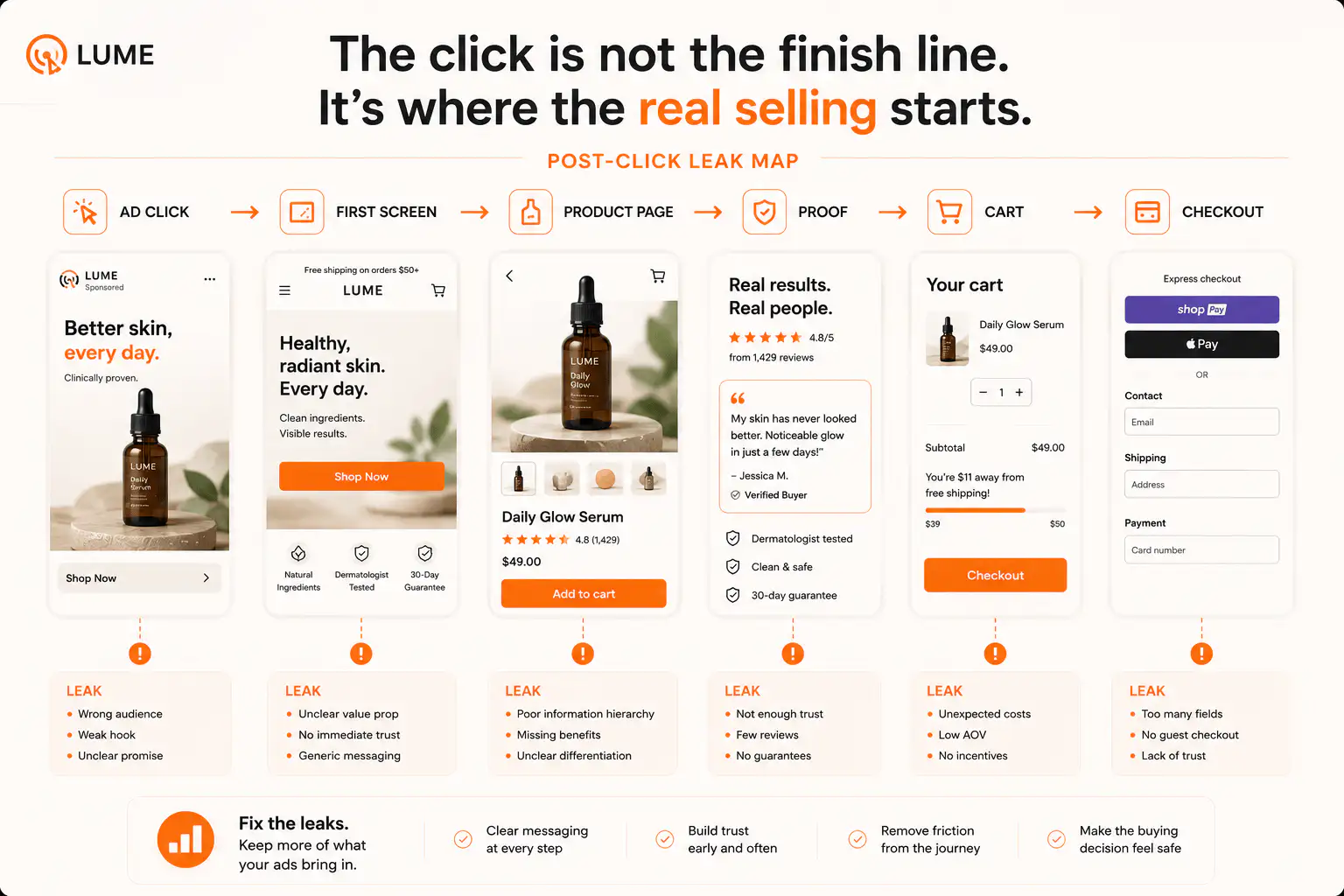
Is it tracking failure or a real buying-path drop?
Shopify's conversion reports are session-based funnel reports, while orders are the finance record. Shopify documents conversion reports as a way to see sessions through landing, cart, checkout, and completed purchase stages. That makes them useful for diagnosis, but not interchangeable with banked revenue.
| What dropped to zero | Likely first suspect | First check |
|---|---|---|
| Ad platform purchases only | Pixel, CAPI, customer events, attribution | Compare Shopify orders by hour against ad events |
| Shopify completed checkout sessions | Analytics methodology, checkout event capture | Compare orders, conversion report, and payment records |
| Add-to-cart and checkout starts | Storefront JavaScript, app conflict, traffic quality | Test PDP action on clean mobile and desktop devices |
| Sessions and orders together | Traffic source, campaign delivery, indexing, feed issue | Check channel reports and campaign change history |
| Orders only in one country or payment method | Gateway, market, currency, shipping, duty, fraud checks | Test affected country, currency, and payment route |
If Shopify orders exist but an external platform reports zero, start with tracking. If Shopify orders stop and real sessions continue, start with the buying path, checkout, payment, or traffic quality.
What timeline should you build first?
Build the timeline before you fix anything. A Shopify Community merchant described sessions continuing while active carts, checkouts, and purchases fell to zero for hours. That kind of symptom cannot be diagnosed from a daily conversion-rate average.
- Mark the first hour where the drop appears.
- Pull sessions, product views, add-to-carts, checkout starts, purchases, and revenue by hour.
- List every theme edit, app install, app uninstall, pixel change, payment change, shipping change, feed edit, and campaign change in the prior 72 hours.
- Compare traffic source, country, device, browser, and landing page mix before and during the drop.
- Record whether customer support, chat, email, or session recordings show blank pages, failed buttons, payment errors, or repeated retries.
- Freeze the timeline in a doc before more changes overwrite the evidence.
The goal is not to prove one dramatic root cause. Often the timeline shows several unrelated regressions that happened close together: a pixel disconnect, a payment-method edit, a feed change, and a traffic-quality shift. Treating those as one vague platform problem wastes time.
When should you suspect checkout or payment?
Suspect checkout or payment when checkout starts continue but completed purchases stop, when payment attempts fail, when one wallet or gateway performs differently, or when customer messages mention blank screens, failed payment loops, unavailable methods, or checkout sessions disappearing.
- Run test orders with each active payment method.
- Test mobile wallet, card, PayPal, Shop Pay, local methods, and buy-now-pay-later separately.
- Use clean devices, private windows, and a mobile network, not only your logged-in desktop.
- Test the affected country, currency, shipping zone, and market if the drop is regional.
- Check whether discount codes, shipping rates, duties, or taxes appear only after checkout starts.
- Review abandoned checkouts for repeated payment failure patterns.
Do not over-index on your own successful test. One public Shopify Community thread included the exact trap: the merchant could complete checkout, but at least one customer reported a blank screen before purchase. Your test only proves your route works, not that every buyer route works.
When should you suspect app or theme interference?
Suspect app or theme interference when add-to-cart sessions also fall to zero, buttons stop responding for some users, cart drawers fail, sticky bars desync, popups cover controls, or session recordings show rage clicks before checkout. Checkout cannot explain a dead add-to-cart button.
| Symptom | Storefront suspect | How to isolate it |
|---|---|---|
| CTA click does nothing | Theme JavaScript, sticky ATC, variant app | Disable recent scripts in a duplicate theme and retest |
| Cart opens but item missing | Cart drawer app, bundle app, subscription app | Compare cart drawer vs full cart page behavior |
| Variant resets before add-to-cart | Variant picker, options app, sticky bar | Switch variants and verify cart line item |
| Mobile users fail but desktop works | Overlay, viewport, tap target, keyboard, popup | Test real mobile devices and session recordings |
| Only some traffic sources fail | Landing page scripts, UTM-specific popups, consent layer | Compare ad landing path against direct path |
When is the traffic the problem?
Traffic is the suspect when sessions rise but buyer actions fall across the whole path. The Reddit ecommerce thread showed a common version of the issue: analytics counted hundreds of product-page visitors, while the operator was unsure whether the missing buyers were real shoppers, bots, low-intent visitors, or tracking gaps.
That does not mean the store is fine. It means you should separate traffic quality from page quality. Break the funnel by source, campaign, landing page, device, country, and new versus returning users. A paid-social spike with no add-to-cart is different from organic search reaching PDPs and failing at payment.
- Look for high sessions with under-10-second engagement.
- Compare add-to-cart rate by source, not only total conversion rate.
- Check direct traffic spikes from odd locations or data centers.
- Review landing pages with high sessions and no product actions.
- Separate bot-like browsing from real shoppers who reached cart or checkout.
- Do not optimize a PDP using traffic that never intended to buy.
How do tracking and customer events fail?
Tracking fails when events stop firing, fire twice, fire on the wrong pixel, lose consent, miss checkout, or move through a new Customer Events setup without equivalent event coverage. Shopify describes pixels as JavaScript that collects and passes behavioral data from the online store, checkout, and customer account pages.
That matters because tracking can break while the store still sells. It can also look fine while it trains ad platforms on bad events. The dangerous case is not a visible zero; it is a silent mismatch that pushes budget decisions in the wrong direction for weeks.
- Run a real test order and verify Shopify order, GA4 purchase, Google Ads conversion, Meta purchase, and email/SMS purchase event.
- Confirm the active pixel IDs and ad account connections.
- Check Customer Events for active pixels and consent state.
- Verify browser and server events deduplicate correctly when both exist.
- Check whether Shop Pay, PayPal, wallets, subscriptions, or third-party gateways bypass expected event paths.
- Compare event timestamps against the actual order timestamp.
What should you fix before touching ads?
Fix evidence quality before ad settings. If attribution is wrong, ad-platform optimization can learn from the wrong buyers or miss real ones. If checkout is intermittently broken, higher budgets only send more shoppers into the same failure. If traffic quality changed, page redesign may chase a false signal.
| Before scaling ads, prove | Pass condition |
|---|---|
| Orders reconcile | Shopify order count and payment records match the business reality |
| Core funnel events fire | View content, add-to-cart, checkout started, and purchase are present where expected |
| Customer path works | Clean-device tests complete purchase across main devices, countries, and payment methods |
| Traffic is real enough | Top sources show plausible engagement and product actions |
| Recent changes are isolated | Theme, app, checkout, shipping, payment, and pixel edits are mapped to the incident window |
| Recovery is monitored | Hourly dashboard watches sessions, carts, checkouts, orders, and source mix after the fix |
If you cannot explain the incident from a single daily dashboard, you need a smaller view: hour, source, device, landing page, and funnel step. Most zero-drop diagnoses become obvious only after the data is narrowed.
What is the fastest triage order?
Use this order when a funnel drop is active. It protects revenue first, then measurement, then longer-term CRO. Skipping the order usually creates extra changes that make the incident harder to read.
- Confirm whether real Shopify orders stopped.
- Check whether payment capture, fulfillment, and order notifications still work.
- Test the exact buyer path on clean mobile and desktop devices.
- Compare sessions, add-to-carts, checkout starts, and purchases by hour.
- Segment the drop by source, country, device, landing page, and product.
- Review recent app, theme, payment, shipping, checkout, feed, and pixel changes.
- Check Customer Events, ad pixels, GA4, and deduplication.
- Inspect session recordings or heatmaps for broken actions.
- Roll back the most likely recent change in a controlled way.
- Monitor recovery hourly before resuming normal campaign decisions.
Need a clean read on the drop?
If your Shopify funnel suddenly stopped making sense, get a Free Buying Journey First-Look. We will separate tracking gaps, traffic shifts, checkout friction, app conflicts, and real page leaks before you spend more budget on the wrong fix.
FAQ
Why would Shopify sessions continue while carts and checkouts drop to zero?
That pattern can come from low-intent or bot traffic, a broken add-to-cart path, app or theme JavaScript interference, regional checkout friction, or analytics changes. Start by testing the storefront path and segmenting sessions by source, device, country, and landing page.
Should Shopify orders or ad platform purchases be trusted first?
Use Shopify orders and payment records as the finance truth. Use ad platform purchases for campaign optimization and diagnostics. If ad purchases drop to zero while Shopify orders continue, the first suspect is tracking, attribution, consent, pixel connection, or event setup.
Can a checkout problem be invisible to the store owner?
Yes. A checkout or cart issue can affect only certain devices, regions, payment methods, wallets, apps, or customer sessions. A successful owner test is useful, but it does not prove the path works for every real buyer route.
What should I check after a sudden conversion tracking drop?
Check active pixel IDs, Shopify Customer Events, GA4 events, Google Ads and Meta purchases, browser and server deduplication, consent settings, payment-method paths, Shop Pay or PayPal behavior, and a real test order from click through purchase.
When should I pause ads after a Shopify funnel drop?
Pause or reduce spend when real orders stop, tracking is clearly unreliable, checkout cannot be verified, or traffic quality changes sharply. If orders continue and only one analytics tool is wrong, fix tracking before making campaign decisions.
Sources and verification notes
- Shopify Community, checkout and platform anomaly report, retrieved 2026-07-07
- Shopify Community, massive store traffic drop discussion, retrieved 2026-07-07
- Reddit r/ecommerce, analytics and actual conversions discussion, retrieved 2026-07-07
- Shopify Help Center, conversion rate breakdown and behavior reports, retrieved 2026-07-07
- Shopify Help Center, pixels and customer events, retrieved 2026-07-07
- Shopify Help Center, accounting for discrepancies in legacy analytics data, retrieved 2026-07-07
- Shopify Help Center, measuring marketing performance and online store conversion report, retrieved 2026-07-07