Field notes/Product Page & CRO
Shopify Abandoned Cart Emails Ignored: Fix the Hesitation Before the Reminder
Abandoned cart emails are downstream of the buying journey. If the reminder repeats the same doubt that made the shopper leave, better automation will not fix the leak.
Ignored abandoned cart emails usually mean one of two things: the message never earned attention, or the cart reminder is trying to solve a doubt that should have been handled on the product page, cart, or checkout path.
Why are Shopify abandoned cart emails ignored?
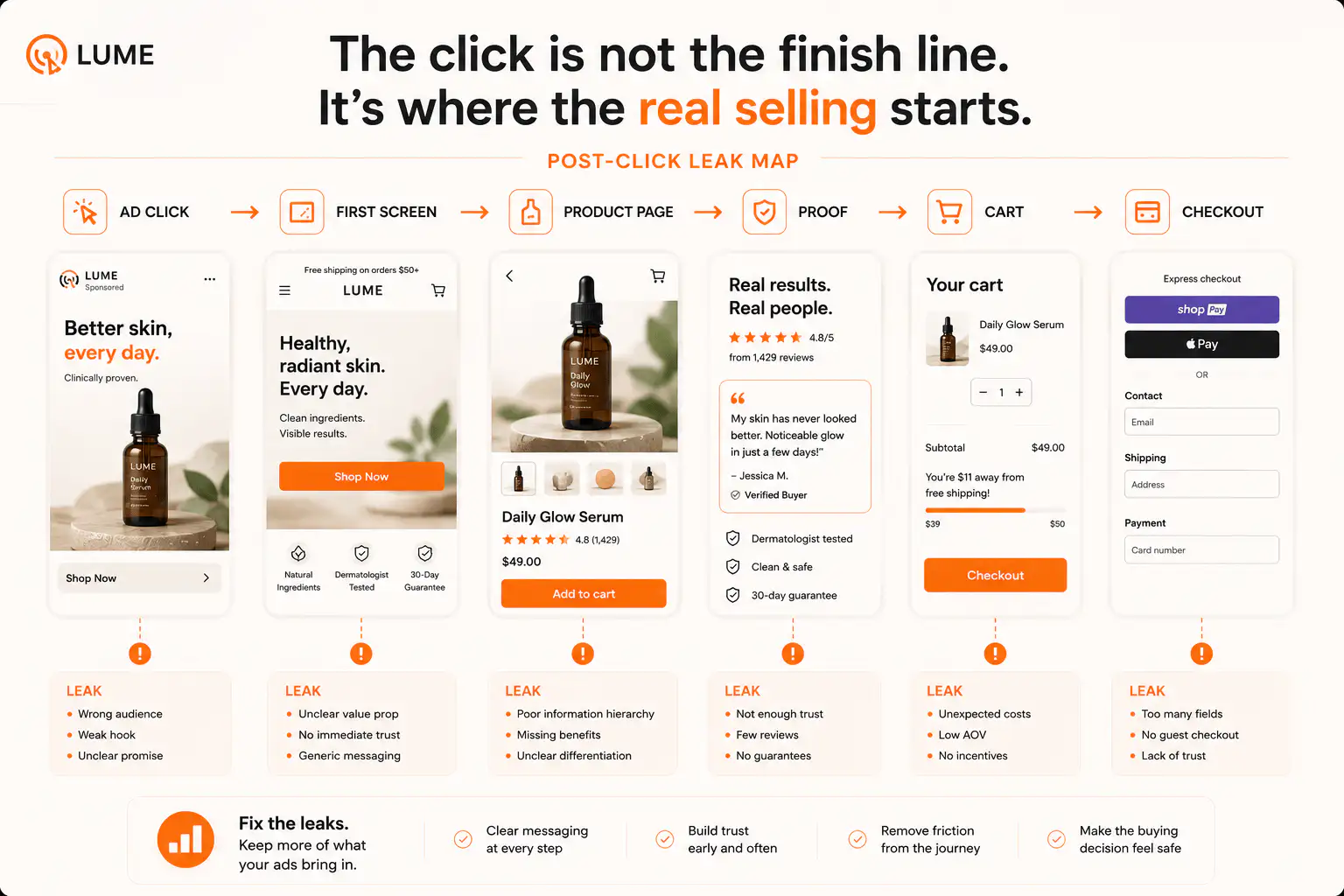
Shopify abandoned cart emails get ignored when the buyer either did not trust the store enough to return or the email does not answer the real reason they left. The problem can be email-side: deliverability, weak subject lines, poor timing, low-intent traffic, or too many generic reminders. But for many stores, the cause starts earlier. Shoppers leave because shipping feels too expensive or slow, the total cost appears late, the return policy is unclear, payment trust is weak, the product page did not build enough confidence, or the cart reveals a new risk. A reminder only works when it removes that specific hesitation.
Key takeaways
- Abandoned cart emails work best when the shopper left with a recoverable nudge problem, not a broken trust, shipping, or offer problem.
- Baymard lists extra costs, slow delivery, payment trust, forced accounts, checkout complexity, returns, errors, and unclear totals among common checkout abandonment reasons.
- Shopify abandoned checkout emails can bring shoppers back to their saved checkout, but the email cannot repair a page path that created unresolved doubt.
- Check deliverability and traffic quality, then map the exact hesitation that happened before the reminder.
An abandoned cart email is not a magic second chance. It is a follow-up to a buying journey that already failed once. If the shopper left because they were distracted, a reminder can help. If they left because the store created doubt, the reminder has to answer that doubt or it will be ignored.
Shopify lets merchants send abandoned checkout emails that link shoppers back to the saved checkout. That solves return-path friction. It does not solve why the shopper hesitated before the email arrived.
Is the problem email deliverability or buyer hesitation?
Start with deliverability because it is the fastest disqualifier. If open rates suddenly collapse across flows, check sending domain reputation, SPF, DKIM, DMARC, spam placement, list health, recent template changes, and whether a new app changed the sender or tracking domain.
But do not stop there. A store can have acceptable email delivery and still get ignored because the email repeats the same generic line: 'You left something behind.' That message does not answer shipping shock, weak proof, delivery doubt, return risk, or product uncertainty.
| Symptom | Likely first check | What not to do first |
|---|---|---|
| Open rate dropped suddenly | SPF, DKIM, DMARC, sender reputation, template changes | Rewrite the cart page before email delivery is verified |
| Opens happen but clicks are weak | Subject-message match, offer clarity, product image, shipping promise | Add another discount immediately |
| Clicks happen but orders do not | Cart total, delivery, returns, payment trust, checkout errors | Assume the email platform failed |
| Many carts look fake or low quality | Traffic source, bot traffic, giveaway traffic, popups, add-to-cart intent | Send more reminders to every cart |
| Only mobile carts ignore recovery | Mobile cart, checkout loading, wallet visibility, variant review | Optimize desktop email design only |
What hesitation should the abandoned cart email answer?
Baymard's cart abandonment research points to practical checkout-stage reasons: extra costs, slow delivery, card trust, forced accounts, checkout complexity, unsatisfactory returns, site errors, unclear totals, limited payment methods, and declined cards. Those are not email copywriting issues. They are buying-path issues.
- If shipping cost caused the exit, show the shipping threshold, delivery estimate, or total-cost clarity before the cart and in the email.
- If delivery time caused the exit, use the product page, cart, and reminder to state realistic delivery timing.
- If trust caused the exit, add proof near the CTA and cart, then echo that proof in the reminder.
- If returns caused the exit, put the short return or exchange promise near the cart action.
- If price caused the exit, explain value and offer context before discounting.
- If mobile friction caused the exit, fix the mobile cart and checkout path before increasing reminder frequency.
Open one recent abandoned checkout and ask: what new information would make this shopper feel safe enough to continue? If the answer is not in the email, the reminder is not doing recovery work.
When should you fix the cart before the email flow?
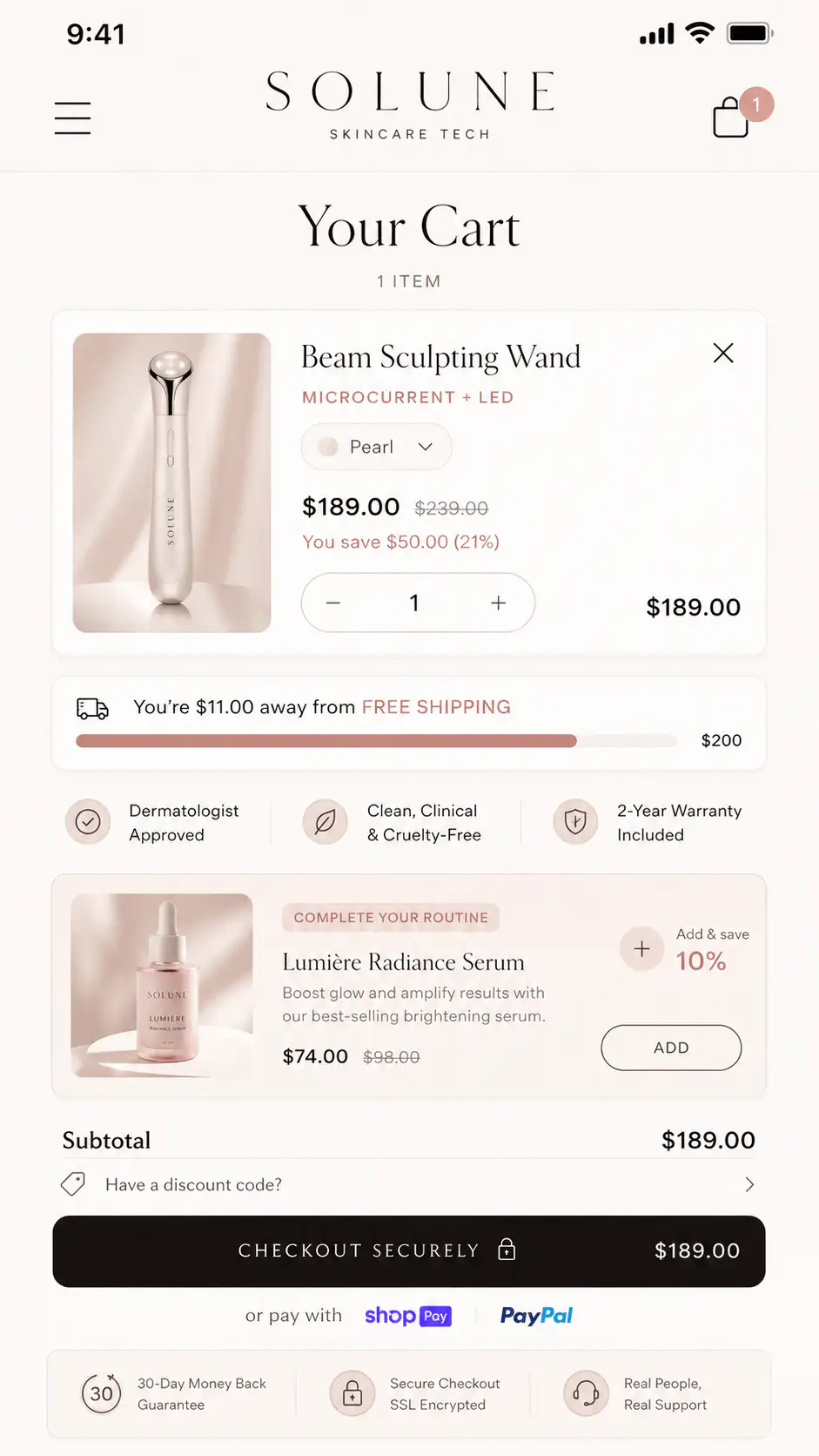
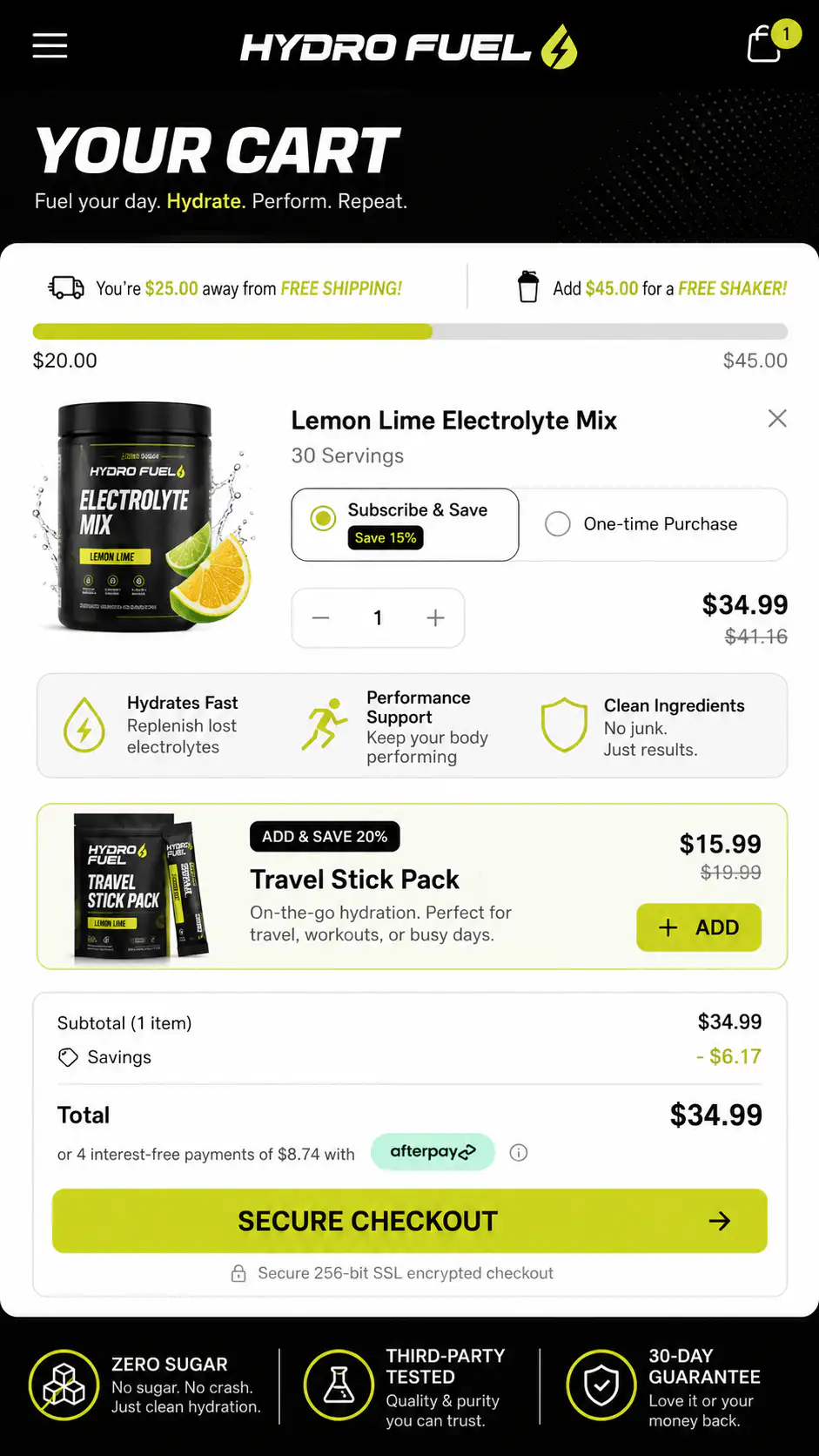
Fix the cart first when shoppers are leaving because the cart reveals something the product page hid. Common examples: shipping is unknown until cart, discounts do not appear clearly, delivery timing is vague, returns are hidden, payment options are missing, or the selected variant is hard to review.
| Cart friction | Page or cart fix | Email angle |
|---|---|---|
| Shipping surprise | Show threshold or estimate near PDP CTA and cart subtotal | Remind them what delivery costs and when it arrives |
| Return anxiety | Add short return promise near CTA and cart checkout button | Lead with easy exchange or return reassurance |
| Weak proof | Add review snippet, buyer photo cue, or guarantee near decision points | Use proof from buyers like them |
| Discount confusion | Show automatic discount state before checkout | Confirm the offer is already applied or explain the code |
| Variant uncertainty | Make size, color, quantity, and bundle contents obvious in cart | Show exactly what is saved in the cart |
| Payment doubt | Show trusted wallets or accepted payment methods near checkout action | Mention the safe checkout path without badge spam |
Should the first reminder offer a discount?
Do not make discounting the default first move. A discount can rescue price-sensitive carts, but it can also train shoppers to abandon, reduce margin, and avoid the real leak. First ask whether the shopper needed clarity, trust, delivery confidence, or a cleaner cart.
- First reminder: product image, saved cart, one specific reassurance, direct checkout link.
- Second reminder: answer the strongest likely objection, such as delivery, returns, proof, or fit.
- Third reminder: use an incentive only when margin allows and the buyer appears high intent.
- Suppress or reduce reminders for low-quality carts, fake traffic, or users who never reached meaningful intent.
How should you segment abandoned cart reminders?
Segment by hesitation, not only by time delay. A high-AOV cart needs more trust and support context than a low-risk replenishment item. A first-time visitor from TikTok needs more offer continuity than a returning customer who already knows the brand.
| Segment | What the reminder should emphasize |
|---|---|
| First-time cold traffic | Proof, store legitimacy, delivery, returns |
| Returning customer | Saved cart, replenishment, loyalty or convenience |
| High-AOV cart | Guarantee, support, payment options, product proof |
| Low-ticket impulse cart | Fast checkout, shipping clarity, simple reminder |
| International cart | Duties, delivery timing, currency, returns |
| Mobile cart | Tap-friendly checkout link and concise reassurance |
What should you check before changing the automation?
Before adding apps, SMS, push, or a longer flow, run a plain buying-path audit. Place a real test order on mobile and desktop. Abandon a cart from the same traffic path customers use. Click the recovery email. Confirm the cart returns cleanly, shows the right items, and does not introduce a new surprise.
- Check whether abandoned checkouts are real buyer sessions or low-quality traffic.
- Verify the email sends, lands in inbox, and links to the correct saved checkout.
- Review product image, product title, variant, price, discount, and shipping in the cart.
- Check whether the cart answers delivery, returns, payment, and support questions.
- Test the recovery click on mobile in the same browser context shoppers use.
- Compare recovery clicks against completed orders, not only opens.
When are abandoned carts a traffic-quality problem?
Cart recovery gets noisy when traffic is curiosity-heavy, incentive-driven, or poorly matched to the product. If a campaign produces many weak add-to-carts but few checkout starts, the cart email may be chasing people who were never qualified. Diagnose the landing path before blaming the flow.
- A giveaway, viral post, or broad ad creates carts from shoppers with low purchase intent.
- The ad sells one promise, but the landing page shows a different product or bundle.
- The product page encourages add-to-cart before answering shipping, proof, or fit questions.
- The cart exists mostly because shoppers are checking total cost.
- Checkout starts are low, meaning the cart is not earning enough confidence to continue.
Want the cart hesitation mapped?
If abandoned cart emails are being ignored, the leak may be in the product page, cart, delivery promise, or traffic path. Get a Free Buying Journey First-Look before adding another recovery app or discount.
FAQ
Why are my Shopify abandoned cart emails not converting?
They may not be converting because the email is generic, deliverability is weak, traffic quality is low, or the shopper left with unresolved doubt. Check shipping cost, delivery time, return clarity, trust, payment options, and cart usability before adding more reminders.
Should I add a discount to abandoned cart emails?
Use discounts carefully. If shoppers leave because of hidden costs or weak trust, a discount may hide the problem temporarily. Try clarity, proof, delivery reassurance, and saved-cart context first, then use incentives for high-intent carts when margin allows.
How many abandoned cart emails should a Shopify store send?
Most stores should start with a short sequence: one quick reminder, one objection-handling follow-up, and one final nudge only when appropriate. More emails are not better if they repeat the same unresolved doubt or hit low-intent carts.
Are abandoned cart emails a checkout problem or an email problem?
They can be either. First verify delivery, opens, clicks, and saved-checkout links. Then inspect the buying path: product page, cart, shipping, returns, payment, checkout loading, and mobile behavior. The stage where shoppers hesitate tells you what to fix.
What should an abandoned cart email say?
It should show the saved product, make the return path easy, and answer one likely hesitation. Examples include delivery timing, return reassurance, customer proof, payment confidence, or discount clarity. Avoid generic urgency if the shopper needed practical information.
Sources and verification notes
- Shopify Help Center, Recovering abandoned checkouts, retrieved 2026-07-11
- Baymard Institute, 50 Cart Abandonment Rate Statistics 2026, retrieved 2026-07-11
- Baymard Institute, Cart and Checkout Usability Research, retrieved 2026-07-11
- Klaviyo, Abandoned Cart Benchmark Report, retrieved 2026-07-11
- Reddit r/shopify, My abandoned cart emails are getting completely ignored, retrieved 2026-07-11
- Reddit r/shopify, Abandoned cart email open-rate drop discussion, retrieved 2026-07-11
- Shopify Community, Best abandoned cart recovery app discussion, retrieved 2026-07-11
- Shopify Community, No sales or abandoned carts discussion, retrieved 2026-07-11