WordPress to Shopify Migration SEO: What to Map Before URLs Change
A WordPress to Shopify move should start with a URL and intent map, not theme selection. Preserve what already earns traffic, then rebuild the buying path around Shopify's structure.
WordPress to Shopify migration SEO is mostly controlled before launch. The important work is inventorying old URLs, mapping each valuable page to its Shopify replacement, preserving search intent, importing content carefully, updating internal links, and validating the move in Search Console after launch.
What should you map before moving WordPress to Shopify?
Before moving a WordPress or WooCommerce site to Shopify, map every URL that already has search value, backlinks, internal links, revenue, or buyer intent. Each old page needs a new Shopify destination: product, collection, page, blog post, or a deliberate removal decision. Shopify's URL structure is different, so preserving the exact path is not always possible. The goal is to preserve intent, equity, and the buyer journey. Build the redirect spreadsheet before launch, import redirects in Shopify, update internal links, migrate key content and metadata, submit the new sitemap, and monitor Search Console for 404s, indexing changes, and unexpected traffic drops.
Key takeaways
- Shopify has fixed URL patterns, so many WordPress and WooCommerce paths will change even when the page content stays similar.
- Map old URLs to the closest new Shopify destination by intent; do not send every old page to the homepage.
- Export redirects, internal links, metadata, products, collections, blog posts, and high-traffic URLs before the old site disappears.
- Post-launch checks should include redirects, sitemap submission, crawl errors, analytics, product pages, collection paths, and checkout.
A WordPress to Shopify migration can protect SEO, but only if the move is treated as a mapping project. The risky part is not that Shopify uses different templates. The risky part is launching a new store before the old URLs, content purpose, and buying paths have been accounted for.
The common founder mistake is starting with theme selection, app lists, or product import tools. Those matter, but they do not tell Google or buyers where the old product, category, blog, and policy pages moved. The SEO plan starts with the old site.
Why do WordPress to Shopify migrations lose SEO?
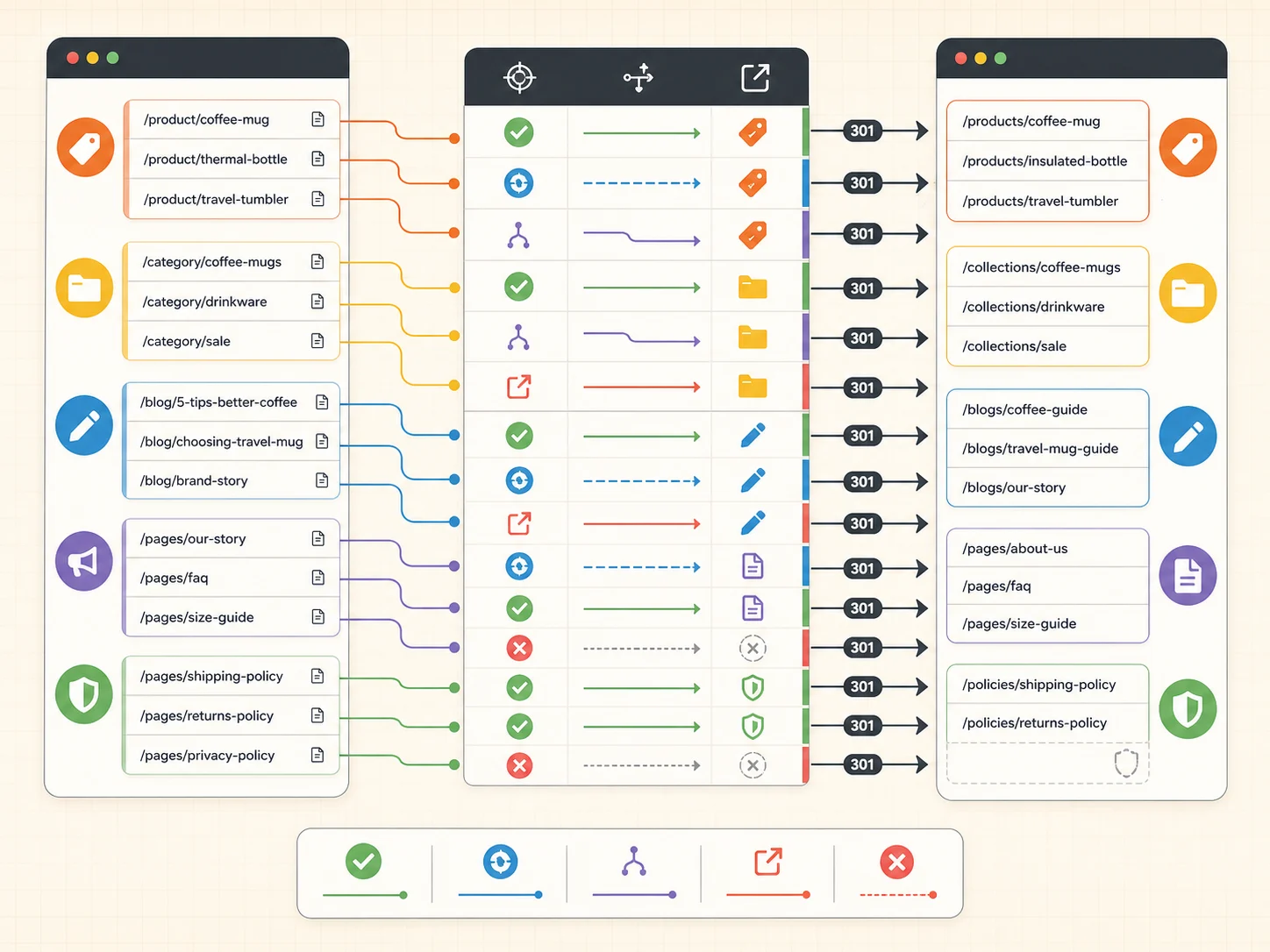
Most migration SEO loss comes from changed URLs, missing redirects, weaker replacement pages, broken internal links, or content that was imported without its original search purpose. Google documents site moves with URL changes as a process that needs redirects, monitoring, and validation, not a one-click platform switch.
Shopify also has fixed URL patterns. Products usually live under /products/, collections under /collections/, pages under /pages/, and blog posts under a blog path. A WordPress or WooCommerce structure like /category/product-name/ or /product/product-name/ often cannot be copied exactly.
If the old site has organic traffic, backlinks, indexed blog posts, or product URLs shared in email and social, assume URL changes matter until the redirect map proves otherwise.
What should go into the URL inventory?
The inventory should include every page that could matter to search, revenue, or customer navigation. That means more than product URLs. Include categories, blog posts, buying guides, FAQs, policy pages, lookbooks, landing pages, PDF links, and any page with backlinks or Search Console impressions.
| Old URL type | What to capture | Likely Shopify destination |
|---|---|---|
| WooCommerce product | Old URL, product handle, traffic, backlinks, revenue | Shopify product |
| WordPress category | Collection intent, ranking queries, product set | Shopify collection |
| Blog post or guide | Topic, internal links, traffic, lead value | Shopify blog post or page |
| Landing page | Campaign source, offer, CTA, conversion role | Shopify page or landing page |
| Policy/support page | Customer questions, legal/trust role | Shopify page or policy |
| Deleted or merged page | Reason for removal, closest replacement | Relevant page or intentional 404 |
Do not rank the inventory only by pageviews. A low-traffic size guide, wholesale page, return page, or comparison guide can still protect revenue if buyers use it near purchase. Migration work should preserve buying confidence, not just search sessions.
How should old URLs be mapped to Shopify URLs?
Map each old URL to the closest new page by search intent and buyer task. A product should redirect to the same product when possible. A retired product should redirect to the replacement product, collection, or guide that answers the same need. A blog post should not redirect to a product unless that is genuinely the closest match.
- Export current WordPress URLs from the sitemap, crawler, Search Console, analytics, and backlink tools.
- Assign each URL a page type: product, collection/category, blog, page, landing page, policy, media, or remove.
- Create the future Shopify URL for each page that will exist after launch.
- Mark the closest destination for every old URL.
- Flag pages where the content must be rebuilt before a redirect is safe.
- Import redirects into Shopify and test a sample before launch.
- Keep the redirect file as the post-launch debugging source of truth.
A homepage redirect is usually a last resort, not a migration strategy. It breaks the buyer's path and gives search engines a weak signal about the old page's replacement.
Which pages should be kept, rebuilt, merged, or removed?
Migration is a good moment to stop carrying weak pages forward, but deletion needs a reason. Keep pages that already rank, earn links, answer buyer questions, or support conversion. Rebuild pages where the old content has value but the shopping path is weak. Merge thin pages only when one stronger destination can satisfy the same intent.
| Decision | Use it when | Migration action |
|---|---|---|
| Keep | The page ranks, converts, earns links, or answers a necessary buyer question | Migrate content and redirect old URL to new equivalent |
| Rebuild | The page has demand but the old layout, copy, or UX is weak | Create stronger Shopify page before launch |
| Merge | Several old pages answer the same intent with thin content | Build one stronger destination and redirect old URLs there |
| Redirect to category | Product is gone but category intent remains | Redirect to a relevant collection, not the homepage |
| Let 404 | No replacement exists and the page has no useful demand or links | Remove intentionally and monitor crawl reports |
What content and metadata should move with the page?
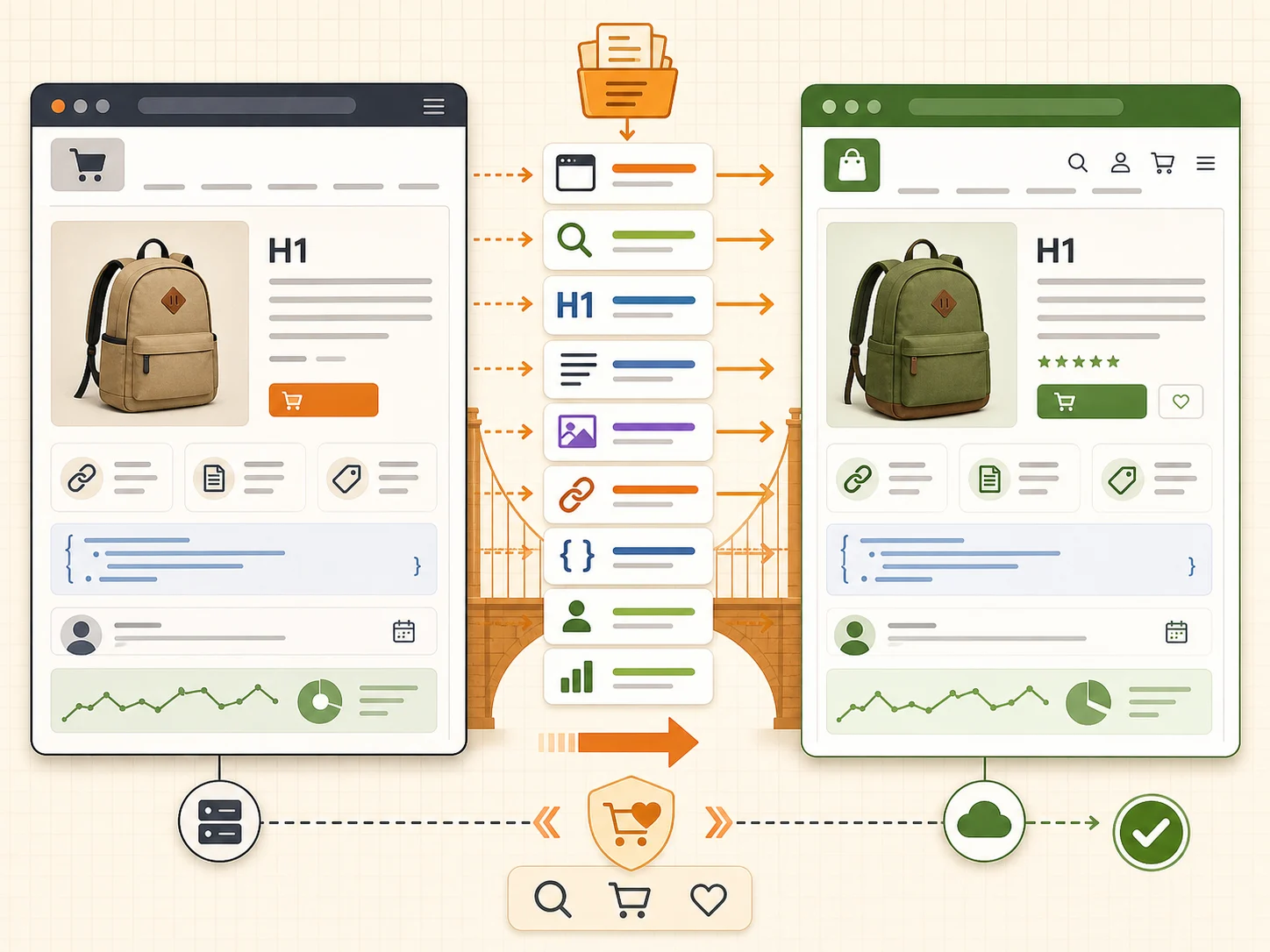
A redirect can point users and crawlers to the new location, but the destination still has to deserve the old intent. Move or rewrite title tags, meta descriptions, headings, body content, image alt text, FAQs, review modules, product specs, variant explanations, and internal links with the buyer's task in mind.
- Product pages need product identity, value, specs, proof, shipping, returns, variants, and schema-ready facts.
- Collections need useful naming, product-card clarity, filters, and a short explanation of who the collection is for.
- Blog posts need preserved headings, internal links, author/editor context, and updated calls to action.
- Policy and FAQ pages need current shipping, return, payment, and support details.
- Images need migrated files, compressed assets, descriptive alt text, and updated references inside content.
How do internal links break during migration?
Internal links often keep pointing to old WordPress paths after content import. Redirects may catch those clicks, but that still creates unnecessary hops and messy crawl signals. Update navigation, footer links, blog links, product descriptions, collection copy, breadcrumbs, and campaign pages to point directly to the new Shopify URLs.
This matters for buyers too. If a sizing guide, return policy, compatibility chart, or buying guide sends the shopper through a redirect or a broken page, the migration has created friction at the moment trust matters.
What should be checked before launch?
Pre-launch QA should test the search path and the buying path together. A migration can pass a product import checklist and still fail if key old URLs 404, collection filters confuse shoppers, analytics is missing, or checkout does not work cleanly on mobile.
| Pre-launch check | Pass condition |
|---|---|
| Redirect map | Top old URLs resolve to the closest new Shopify pages |
| Sitemap | New Shopify sitemap exists and includes important products, collections, pages, and blogs |
| Internal links | Navigation, footer, blog, product, and collection links point to new URLs |
| Metadata | Important pages have intentional titles, descriptions, headings, and canonical behavior |
| Analytics | Orders, key events, Search Console, and ad pixels are connected intentionally |
| Buying path | Product, cart, checkout, email, and policy flows work on mobile and desktop |
What should be monitored after launch?
After launch, use Search Console, analytics, crawl data, and Shopify reports to find what the pre-launch map missed. Watch 404s, redirect errors, indexed-page changes, sitemap status, top landing pages, product-page conversion, checkout starts, and orders by channel.
- Submit the new sitemap in Search Console.
- Crawl the old URL list and confirm status codes.
- Check Search Console for 404s and redirect issues.
- Compare top organic landing pages before and after launch.
- Review product pages that lost traffic or conversion.
- Fix internal links that still point to old WordPress URLs.
- Add new redirects for important missed URLs quickly.
Planning a WordPress to Shopify move?
If redirects, content, and buying paths are not mapped yet, get a migration first-look before the new Shopify structure is locked in. We will check the URL map, priority pages, conversion risks, and launch QA path.
FAQ
Can I keep the same WordPress URLs on Shopify?
Usually not exactly. Shopify uses fixed URL patterns for products, collections, pages, and blogs. You can often keep the same handle or slug, but the prefix may change. Use 301 redirects from the old WordPress URLs to the closest new Shopify URLs.
Will a WordPress to Shopify migration hurt SEO?
It can hurt SEO if URLs change without redirects, content gets removed, internal links break, or important pages become weaker. A planned migration can reduce risk by mapping URLs, preserving intent, importing content carefully, and monitoring Search Console after launch.
Should every old URL redirect to the homepage?
No. Redirect each old URL to the most relevant new page. Product URLs should usually map to products, category URLs to collections, and articles to equivalent articles or guides. Homepage redirects are weak for buyers and weak for search intent.
Do I need a Shopify SEO app for redirects?
Not necessarily. Shopify has built-in URL redirect management and CSV import. Apps can help with bulk work or 404 monitoring, but the important decision is the redirect map itself: old URL, new destination, and why that destination matches the old intent.
What is the first post-launch SEO check?
Crawl the old URL list and confirm the important URLs return clean redirects to the correct Shopify pages. Then submit the new sitemap, monitor Search Console for 404s and indexing issues, and fix missed redirects before they compound.
Sources and verification notes
- Shopify Help Center, creating and managing URL redirects, retrieved 2026-07-03
- Shopify Help Center, migrate to Shopify, retrieved 2026-07-03
- Shopify Help Center, finding and submitting your sitemap, retrieved 2026-07-03
- Google Search Central, site moves with URL changes, retrieved 2026-07-03
- Shopify Community, WordPress to Shopify traffic and URL structure discussion, retrieved 2026-07-03
- Shopify Community, WordPress to Shopify SEO rankings discussion, retrieved 2026-07-03
- Reddit r/shopify, SEO problems after shifting to Shopify from WordPress, retrieved 2026-07-03