Shopify Markets SEO Drop: What to Check Before Product Snippets Break
Shopify Markets can support international SEO, but the launch needs QA. Use this checklist before market URLs, product snippets, Merchant Center feeds, currency, and checkout promises start contradicting each other.
If product snippets, merchant listings, or international organic traffic drop after enabling Shopify Markets, do not assume Markets itself is the cause. Treat it as a launch QA problem: verify URL structure, hreflang, canonicals, product schema, Merchant Center feed data, currency, shipping promises, and checkout behavior before changing domains or rebuilding the store.
What should you check when Shopify Markets hurts SEO visibility?
When SEO visibility drops after enabling Shopify Markets, check the market setup before blaming the platform. Confirm each market has the intended domain, subdomain, or subfolder; that Shopify is generating the expected hreflang tags; that canonical URLs point to the right primary version; that product pages remain indexable; and that Product structured data still matches the visible price, availability, currency, shipping, and return context. Then compare Search Console product snippet and Merchant listing reports with Merchant Center feed diagnostics. If the page, feed, and checkout disagree, Google and buyers both receive mixed signals. Fix the mismatch, then monitor crawl, indexing, rich result, and order data by market. Most drops trace back to a configuration change, a theme or app edit, or a feed setting rather than to Shopify Markets itself, so record what changed and when before reverting anything.
Key takeaways
- Shopify Markets should be audited before and after launch because international URLs, hreflang, feeds, structured data, and checkout settings can drift apart.
- A drop in product snippets or Merchant listings is not proof that Shopify Markets is broken; it is a signal to compare Search Console, Merchant Center, product schema, and live market URLs.
- The safest launch path is a market-by-market checklist: URLs, indexability, canonicals, hreflang, product schema, feed attributes, currency, shipping, taxes, and checkout.
- Do not change URL structures blindly. First isolate whether the issue is discovery, duplicate/canonical handling, structured data, feed eligibility, or buyer-path mismatch.
Send your store URL and get a free Migration Risk Check: the URLs that need redirects, the data to move, the apps you would replace, the biggest risks for your store, and a realistic timeline. Get the free Migration Risk Check →
Shopify Markets is useful because it lets a store sell across countries with market-specific domains or subfolders, currencies, languages, catalogs, and pricing. That same flexibility creates more places for the buying path and search data to fall out of sync.
The dangerous version is not a small ranking wobble. It is when Search Console shows fewer valid product snippets or merchant listings, Google discovers duplicate market URLs, Merchant Center still says products are approved, and the store owner cannot tell whether the problem is SEO, feeds, checkout, or market configuration.
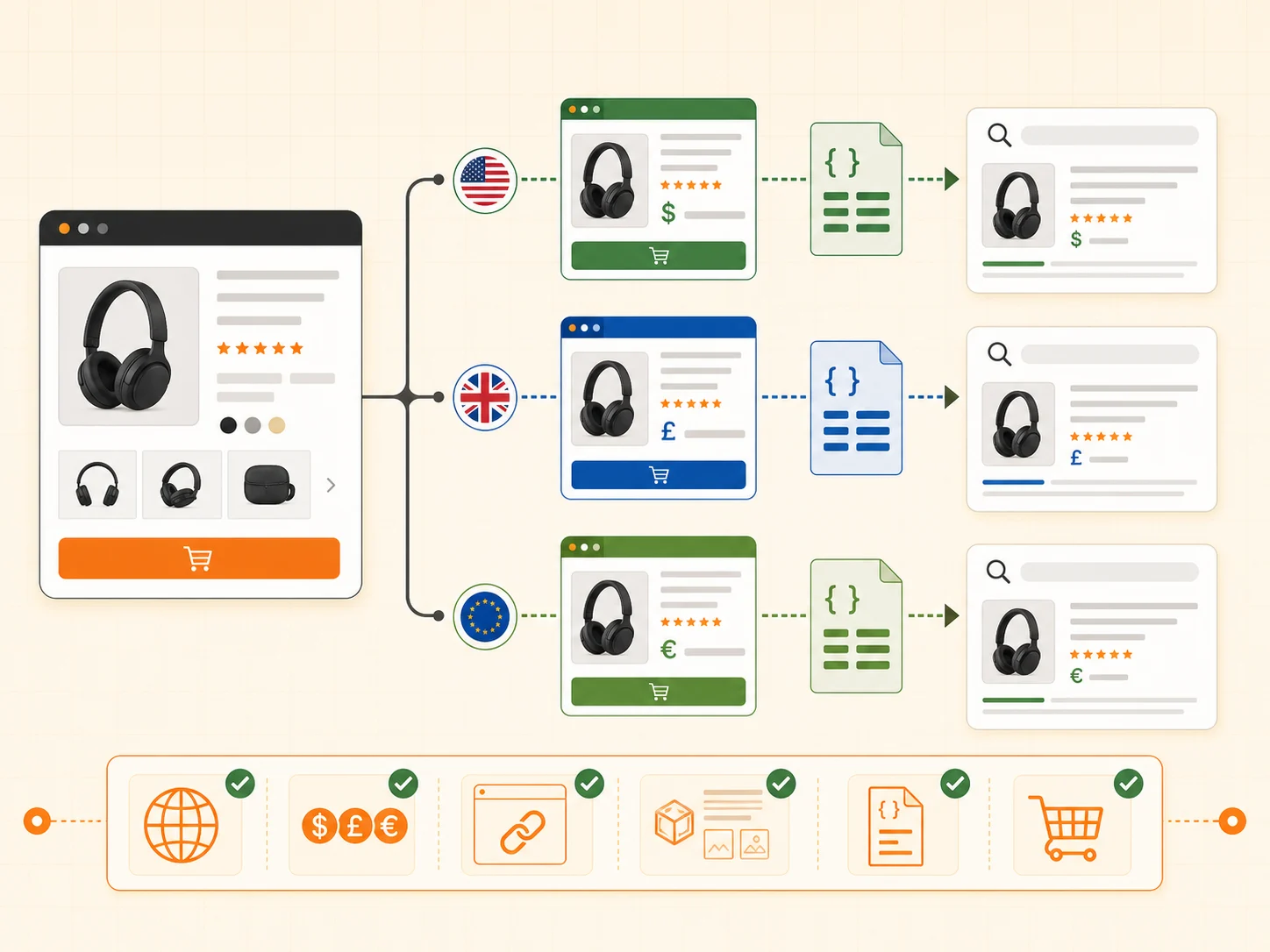
Why can Shopify Markets affect product snippets?
Markets can change how Google sees product pages because a store may now expose alternate versions by country, language, currency, or subfolder. Shopify's documentation says hreflang tags are generated for markets that have a distinct domain, subdomain, or subfolder. That is helpful, but it also means your market architecture needs to be intentional.
Product snippets and merchant listings depend on consistent product signals. Google needs to understand the page, product, offer, price, availability, and merchant data. If the Canadian URL, US URL, product JSON-LD, feed, and checkout each tell a slightly different story, rich result eligibility can become harder to diagnose.
A Search Console product-snippet drop, Merchant Center warning, or ranking decline is a symptom. The cause may be duplicate discovery, canonical selection, feed mismatch, structured data drift, crawl delay, a theme change, or a real market setup error.
What should you audit before enabling a new market?
Before enabling a market, write down what should happen for a buyer and for Google. This sounds basic, but it prevents the most expensive mistakes: launching international paths without knowing which URLs should index, which currency should appear, and what product data Google should receive.
- Choose the market URL pattern: country domain, subdomain, or subfolder.
- Confirm whether the market has unique language or regional content worth indexing.
- Decide which product URLs should be canonical and which should be alternate versions.
- Check whether the theme outputs Product structured data that reflects the selected market.
- Confirm Merchant Center feed attributes for price, currency, availability, shipping, and tax.
- Test the buyer path from market landing URL to PDP, cart, checkout, and payment.
- Record the Search Console and Merchant Center baseline before launch.
| Check | What can break | What to verify |
|---|---|---|
| Market URLs | Google discovers duplicate or unintended paths | Only intended domains, subdomains, or subfolders are linked and indexed |
| Hreflang | Alternates point to missing, wrong, or same-language URLs | Each indexed market URL has a valid reciprocal alternate where appropriate |
| Canonicals | Google chooses the wrong market page as primary | Canonical tags match the intended primary version |
| Product schema | Snippet data no longer matches visible offer | Price, currency, availability, image, brand, and review data match the page |
| Merchant feed | Approved feed does not match page reality | Feed price, currency, URL, availability, and shipping align with market PDPs |
| Checkout | Buyer sees a different country, currency, or shipping promise | Cart and checkout preserve the same market context |
How do you diagnose a product snippet or Merchant listing drop?
Start by separating four systems: crawl/indexing, structured data, Merchant Center, and checkout. They overlap, but they are not the same problem. A page can be indexed while product snippets collapse. A feed can be approved while Search Console reports fewer valid merchant listings. A Rich Results Test can validate one URL while Google is selecting a different canonical at scale.
- In Search Console, compare indexed pages, duplicate/canonical reports, product snippets, merchant listings, and affected URL examples.
- In Merchant Center, compare product diagnostics, feed destination, URL, price, currency, shipping, availability, and item disapprovals.
- On the live PDP, inspect the visible price, selected currency, availability, shipping promise, return promise, and structured data.
- In Shopify, check market domain settings, language settings, pricing adjustments, product availability by market, and shipping profiles.
- In analytics, compare affected markets before and after launch for impressions, product views, cart starts, checkout starts, and orders.
The key is to test actual affected URLs, not only a clean homepage or one product. Pull sample products from the drop, open each market URL, view source or inspect the structured data, then compare that page to the Merchant Center item and the checkout result.
Which Shopify Markets settings matter most for SEO?
The settings that matter most are the ones that change what a search engine and a buyer believe the page represents: URL, language, currency, price, availability, shipping, and checkout eligibility. SEO breaks down when these signals are technically valid in isolation but inconsistent together.
| Setting area | SEO risk | Buyer-path risk |
|---|---|---|
| Domains and subfolders | Duplicate or unexpected market URLs | Buyer lands in the wrong country context |
| Languages | Wrong hreflang or untranslated alternates | Buyer sees mixed language on the PDP or checkout |
| Pricing and currency | Structured data or feed mismatch | Buyer sees a different price later in cart |
| Catalog availability | Indexed products unavailable in market | Checkout blocks the product after interest exists |
| Shipping profiles | Merchant listing shipping mismatch | Delivery promise changes too late |
| Theme/schema apps | Duplicate or stale Product JSON-LD | Search preview promises what the PDP does not show |
What should be checked on the product page itself?
Product pages should stay boringly consistent. The shopper should see the same market, currency, price logic, availability, and delivery expectation from the first PDP view through cart and checkout. Google should see the same offer in structured data and feed data.
- Open the product page from the intended market URL, not only the default market.
- Confirm the page title, canonical, hreflang alternates, and indexability.
- Inspect Product JSON-LD for price, priceCurrency, availability, image, brand, and aggregate rating if used.
- Compare the visible PDP offer with the structured data offer.
- Add the product to cart and check whether currency, tax, duties, shipping, and availability remain consistent.
- Start checkout and confirm that the selected country and currency still match the market.
Teams QA the default market and assume every market works. International SEO issues often live in the alternate path: the subfolder, translated page, market-specific price, unavailable product, or checkout country handoff.
When should you change URLs, canonicals, or market structure?
Change URL structure only after you know what failed. Reversing Markets paths, deleting market URLs, or changing canonicals can create a second migration event. If the issue is feed data, schema mismatch, or product availability, URL changes may add risk without fixing the cause.
Use a keep, fix, rebuild decision. Keep the market structure when URLs are clean and the mismatch is in schema, feed, or checkout settings. Fix templates and feeds when page output is wrong. Rebuild the market architecture only when the URL model itself creates unmanageable duplicates, wrong language targets, or unclear canonical intent.
| Symptom | First move | Do not do first |
|---|---|---|
| Product snippets drop but pages remain indexed | Compare schema, Merchant Center, and affected URLs | Change all market URLs |
| Duplicate canonical issues spike | Sample affected URLs and inspect canonicals/hreflang | Noindex every alternate market |
| Merchant Center approved but rich results disappear | Compare feed attributes to live market PDPs | Assume feed approval means SEO is fine |
| International orders drop | Test buyer path by market and device | Blame rankings before testing checkout |
| Wrong currency appears in checkout | Audit market context handoff | Rewrite product descriptions |
How should you monitor after launch?
Monitor by market, not only sitewide. A total traffic graph can hide a country-specific SEO or checkout issue. Keep a launch log with the exact date Markets settings changed, domains or subfolders launched, feed settings changed, schema apps changed, or theme templates changed.
- Search Console: indexed pages, duplicate/canonical reports, product snippets, merchant listings, impressions by country.
- Merchant Center: item approval, price/currency mismatches, shipping/tax warnings, URL mismatch errors.
- Shopify: sessions, product views, add-to-cart, checkout reached, completed orders by market.
- Manual QA: sample PDP, cart, checkout, payment, shipping, and confirmation for each priority market.
- Content QA: translated titles, PDP claims, policy copy, delivery promises, and return promises.
Planning or repairing a Shopify Markets launch?
If international SEO, product snippets, feeds, or checkout context are already drifting, get a Shopify Migration First-Look. We will map the market URL, product data, and buying-path checks before you make another risky change.
FAQ
Does Shopify Markets hurt SEO?
Shopify Markets does not automatically hurt SEO. It can support international SEO with market URLs and hreflang, but poor setup can create duplicate discovery, wrong canonicals, feed mismatch, or checkout context problems. Audit the market implementation before blaming Markets itself.
Why did product snippets drop after enabling Shopify Markets?
Product snippets can drop when Google sees conflicting product signals across market URLs, structured data, Merchant Center feed data, canonicals, currency, availability, or shipping. Test affected product URLs and compare the page, schema, feed, and checkout state.
Should every Shopify market have its own URL?
Only if the market needs a distinct regional or language experience. Shopify generates hreflang for markets with distinct domains, subdomains, or subfolders. If all markets share one URL, there may be no alternate versions to reference.
What is the first thing to check after an international SEO drop?
Pull affected URLs from Search Console, then inspect their indexability, canonical tag, hreflang tags, Product structured data, visible price/currency, Merchant Center feed item, and checkout behavior. Work from real examples instead of averages.
Can Merchant Center approval hide a Shopify Markets SEO problem?
Yes. Merchant Center approval means items can be eligible for Merchant Center destinations, but it does not guarantee Search Console product snippet visibility or perfect market-page consistency. Compare approved feed attributes with live market product pages.
Sources and verification notes
- Shopify Community, Shopify Markets caused collapse in Google product snippets and organic impressions, retrieved 2026-07-13
- Shopify Help Center, International SEO for markets, retrieved 2026-07-13
- Google Search Central, Product structured data for merchant listings, retrieved 2026-07-13
- Google Merchant Center Help, supported structured data attributes and values, retrieved 2026-07-13
- Shopify developer documentation, Shopify Markets overview, retrieved 2026-07-13